

Quickstart
The minimal integration: a subscribe button on the product page, one endpoint on your server that creates the order, and a call to open().
-
Set up the panel. In the shop panel enable payment and at least one delivery method. Optionally set a subscription discount.
-
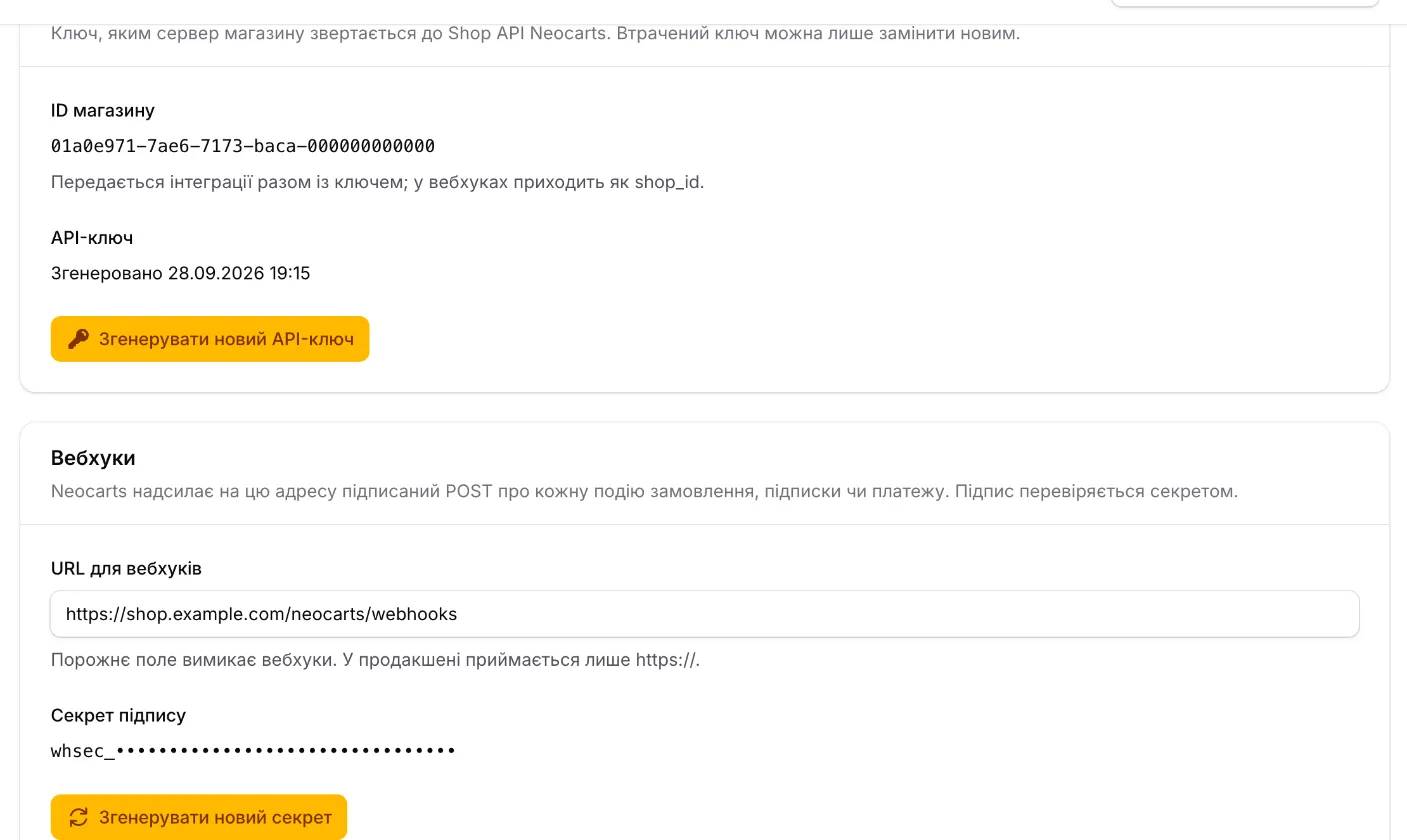
Get the key and shop id. On Settings → Integration click «Generate new API key» and store it — it is shown once. Copy the «Shop ID» from the same tab.
-
Add the script and the button. The script — once per page; the button — under your own «Buy» button:
<script src="https://cdn.neocarts.com/bundle.js" data-shop-id="SHOP_UUID" defer></script><neocarts-button product-id="SKU-1" amount="249000" title="Brit Care Adult Large Breed"variant="12 kg" image="https://shop.example.com/i/brit.jpg"></neocarts-button>product-idis your productexternal_id;amountis the price of one unit in kopecks (249000= 2,490.00 ₴). The shopper picks a frequency in the button’s window. See Subscribe button. -
Build items on the page. On «Checkout» pass the cart lines through
getOrderItems()and send them to your server:const nc = window.NeocartsSubscription;const items = nc.getOrderItems([{ external_id: 'SKU-1', title: 'Brit Care Adult Large Breed', variant: '12 kg',image_url: 'https://shop.example.com/i/brit.jpg', product_url: 'https://shop.example.com/p/brit',price: 249000, quantity: 1 },]);const { orderId } = await fetch('/api/neocarts/order', {method: 'POST', headers: { 'Content-Type': 'application/json' }, body: JSON.stringify({ items }),}).then((r) => r.json()); -
Create the order on the server. Your endpoint calls
POST /v1/shop/orders/createwith the key and returnsorder.id:Terminal window curl -X POST https://core.neocarts.com/v1/shop/orders/create \-H "Authorization: Bearer nc_live_…" \-H "Accept-Language: en" \-H "Content-Type: application/json" \-d '{"locale": "en","redirect_url": "https://shop.example.com/cart?neocarts=checkout","items": [{"external_id": "SKU-1", "title": "Brit Care Adult Large Breed", "variant": "12 kg","image_url": "https://shop.example.com/i/brit.jpg", "product_url": "https://shop.example.com/p/brit","price": 249000, "quantity": 1,"mode": "subscription", "interval_value": 4, "interval_unit": "week"}]}'export async function createNeocartsOrder(items) {const res = await fetch('https://core.neocarts.com/v1/shop/orders/create', {method: 'POST',headers: {Authorization: `Bearer ${process.env.NEOCARTS_KEY}`,'Accept-Language': 'en','Content-Type': 'application/json',},body: JSON.stringify({ locale: 'en', redirect_url: 'https://shop.example.com/cart?neocarts=checkout', items }),});const order = await res.json();if (!res.ok) throw new Error(`${res.status} ${order.message}`);return { orderId: order.id };}Check line prices against your own database — do not trust prices that came from the browser. Fields and errors — Orders.
-
Open checkout and listen to events.
await nc.open({ orderId });nc.on(nc.events.Paid, ({ number }) => { /* clear the cart, show the number */ });nc.on(nc.events.OrderMissing, () => { /* forget orderId, create a new order */ }); -
Test it. Go through checkout as a shopper. On staging payment runs in a sandbox with no real money (Environments); on production pay a small order and refund it from the panel. After payment the order becomes
paid, anactivesubscription appears, and the page receivesneocarts:paid.
Next: integration flow, webhooks, troubleshooting.